Conversion Tracking Checker
Check Google Ads conversion tracking, GA4, enhanced conversions, Consent Mode v2 and the Meta pixel on any store. Shop the site like a buyer and get a score out of 100 with a plain fix list.
 Built by Dan Kabakov: Google Ads specialist, 10+ years in ecommerce
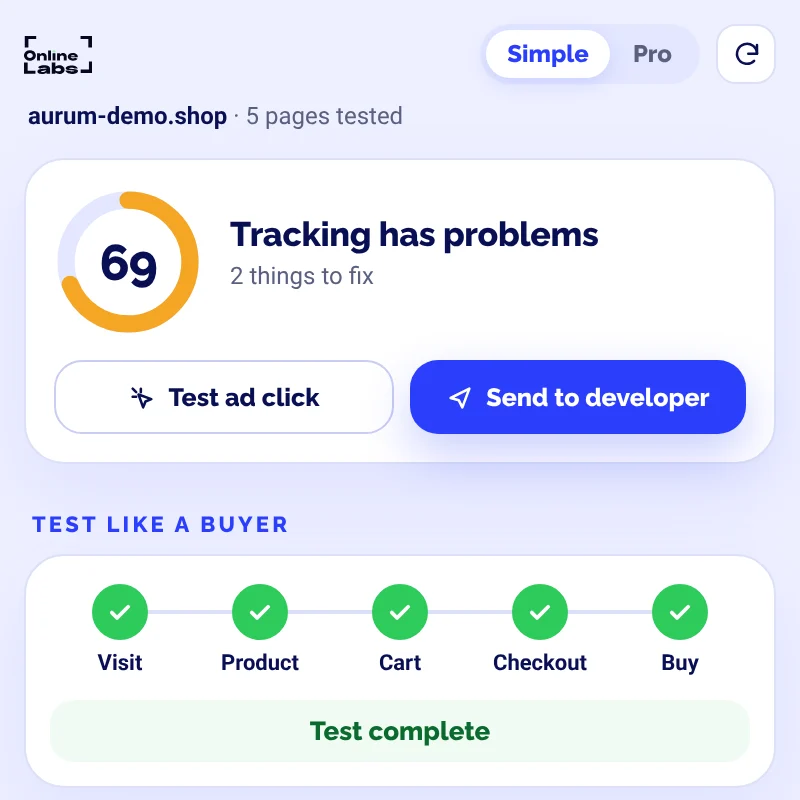
What is a conversion tracking checker?
A conversion tracking checker shows whether your ad platforms actually receive the sales and leads your website produces. The Conversion Tracking Checker by Online Labs is a free Chrome extension that watches every request to the supported ad and analytics platforms during a real test purchase, then checks Google Ads conversions, GA4 ecommerce, enhanced conversions, Consent Mode v2 and the Meta pixel in one pass.
Broken tracking rarely shows an error. The store keeps selling, the tags keep loading, and Google Ads quietly bids on missing or doubled numbers. Most tracking tools show raw events and leave the diagnosis to you. This one turns them into a score and a fix list that a store owner can read and a developer can act on the same day.
ad and analytics platforms read in one test, from Google Ads and GA4 to Meta, TikTok and Microsoft Ads.
buyer steps tracked: Visit, Product, Cart, Checkout and Buy, even when payment detours through another domain.
bytes sent to Online Labs. Every check runs inside your browser and the test clears when you close the tab.
Why conversion tracking breaks silently
A Google Ads conversion only counts when a chain of small handoffs all work, from the ad click to the order confirmation page. One weak link and the sale either disappears from your account or gets reported wrong.
- Ad clickgclid added to the landing URL
- Click ID storedGoogle tag saves it in a cookie
- Consent signalConsent Mode v2 default and update
- Purchase tagvalue, currency, order ID, customer data
- Conversion countedGoogle Ads, GA4, Meta and others
The path every tracked sale has to travel. The checker tests each link in this chain during one test purchase and names the exact step that fails.
What the extension checks
Every result comes from what your browser actually sends and loads while you shop. If a check has no data yet, the panel tells you which step to do next.
Google Ads conversions
Confirms each sale or lead conversion fired, with a numeric value, a valid currency code and an order ID, and flags the same conversion sent twice.
Click ID and enhanced conversions
Press Test ad click to reload the page with a test click ID and confirm it is stored. Then it checks enhanced conversions are sent, hashed and error free.
Consent Mode v2
Decodes the consent signals on every Google hit, names your cookie banner when it is a common one like Cookiebot or OneTrust, and checks the default consent loads before Google tags send data.
GA4 ecommerce
Checks the purchase event carries an order ID, value, currency and items, and catches page_view firing twice from two installs.
Meta and 8 more ad platforms
Meta Purchase value, event ID and advanced matching, plus purchase events from TikTok, Microsoft Ads, Pinterest, Reddit, Snap and Floodlight, and live checks for LinkedIn and X.
Duplicates and data leaks
Finds tags installed twice, steps your dataLayer pushes that no tag sends anywhere, and customer emails leaking to ad platforms in page links.
How to check Google Ads conversion tracking
Add the extension to Chrome
Install it free from the Chrome Web Store, then pin it so the icon sits next to the address bar. It needs Chrome 116 or newer on desktop.
Open the store and click Allow
Click the icon to open the side panel on the site you want to test. Site access starts only after you press Allow, and you can remove it any time in Chrome's extension settings.
Shop like a real buyer
Land on the site, open a product, add it to cart, start checkout and finish a test order. The panel ticks off Visit, Product, Cart, Checkout and Buy as each step is tracked.
Read the score and the fix list
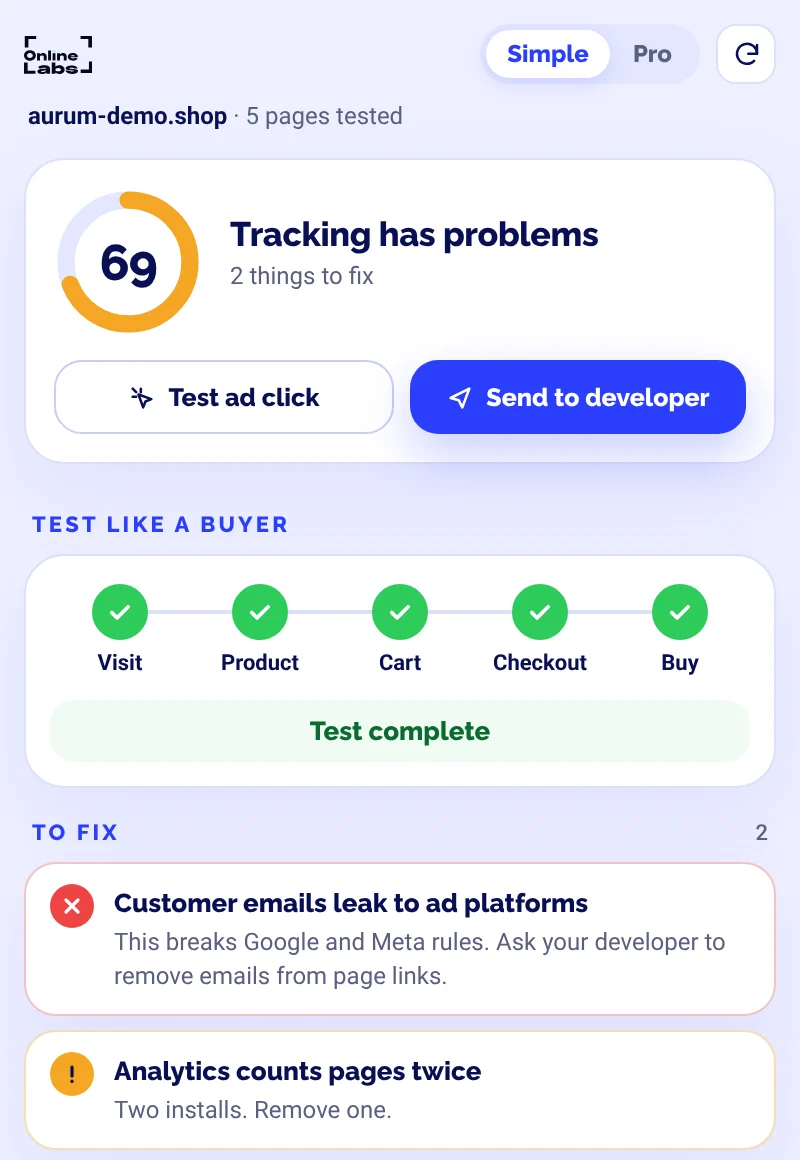
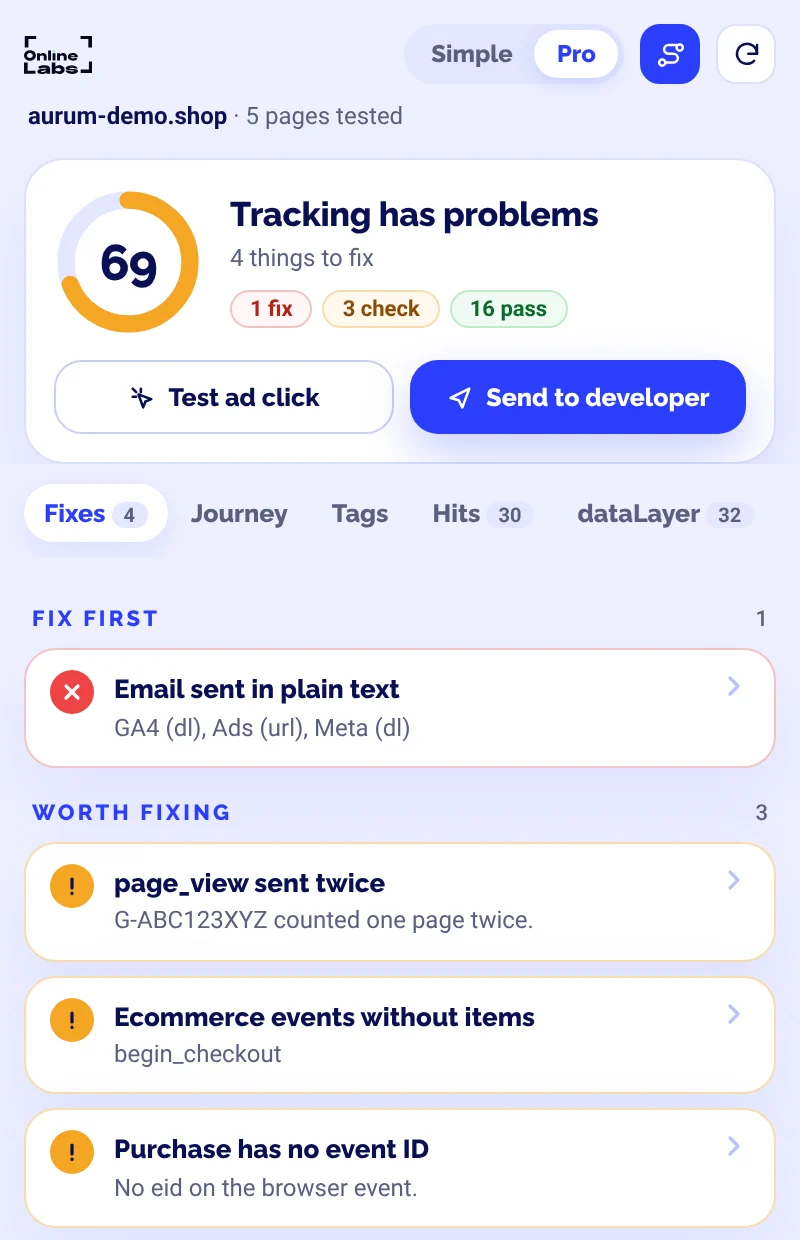
Simple mode explains each problem in plain words. Pro mode shows every tag, hit, parameter and dataLayer event behind the score.
Send the fixes to your developer
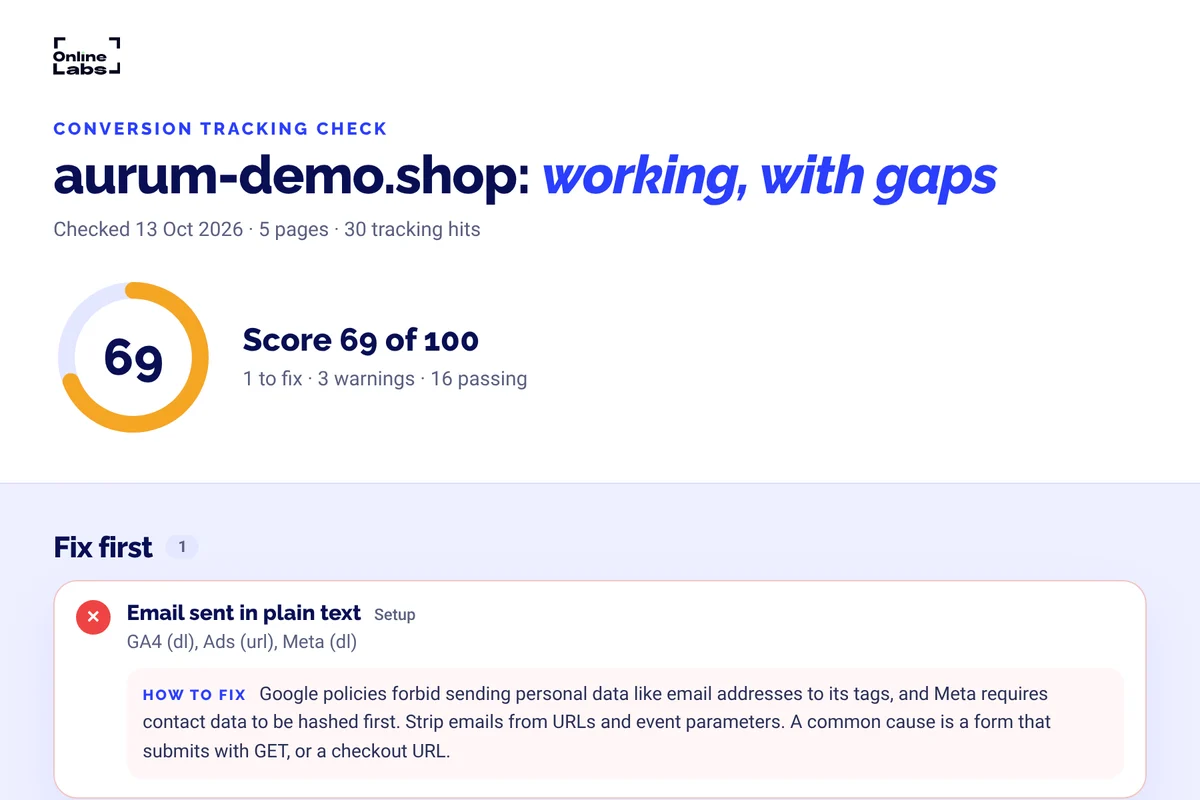
Press Send to developer to copy a clean fix list, or download an HTML report. Email addresses are hidden automatically before anything is shared.
Simple for owners, Pro for developers
The same test, two ways to read it. Switch modes at any time and the panel remembers your choice.
5 common conversion tracking problems it catches
A purchase sent without value, currency or order ID
Google Ads counts the sale with a default value or none, so revenue and ROAS are wrong, and a page reload can count the same order twice. Smart Bidding then optimizes toward the wrong number. Fix: pass the order total, a three-letter currency code and the order ID in the purchase tag, read from the order confirmation data.
The ad click ID is never stored
When the Google tag or the Conversion Linker does not run on the landing page, the gclid from the ad click is never saved in a first-party cookie. A sale a few pages later then cannot be matched to the ad. Fix: load the Google tag on every page, or add a Conversion Linker tag in GTM, then press Test ad click in the extension to confirm the click ID is saved.
Consent loads after the tags
When the cookie banner sets the default consent after tags have already fired, Google receives hits with no consent signal and EU traffic models poorly. Fix: load the consent default first, before Google tags, and update it when the visitor chooses.
Analytics or pixels installed twice
A theme integration plus a GTM tag, or two plugins, send every page_view or PageView twice. Page view counts double and engagement metrics go wrong. Fix: keep one install per platform and remove the duplicate, then run the test again.
Customer emails leaking in page links
Some forms and checkouts put the email address in the URL, and every pixel on the page sends it to Google and Meta in plain text. That breaks both platforms' policies. Fix: submit forms with POST and strip personal data from URLs, then send customer data only through hashed enhanced conversions.
A Tag Assistant alternative for the whole funnel
Google Tag Assistant and Meta Pixel Helper are good tools, each built for one platform. The Conversion Tracking Checker reads all of them in a single test, so you see how Google and Meta both handle the same purchase.
| Tool | Covers | Best for |
|---|---|---|
| Conversion Tracking Checker | Google Ads, GA4, Meta and 8 more | One full test purchase across every pixel, scored out of 100 with a plain fix list for owners and developers. |
| Google Tag Assistant | Google tags only | Developers debugging Google tags and GTM event by event. It shows whether GTM fired a Meta or TikTok tag, not what those platforms received. |
| Meta Pixel Helper | Meta pixel only | Checking which Meta pixel events fire on a page. It does not cover Google Ads, GA4 or other platforms. |
Private by design
The extension only watches tracking. It never blocks or edits a request, and Test ad click and Allow just reload the page.
Runs in your browser
No servers, no analytics and no account. Nothing the extension reads is sent to Online Labs or to anyone else.
Access only after Allow
Site access is requested inside the panel with an Allow button. You can remove it at any time in Chrome's extension settings.
Cleared when you are done
The test lives in session storage for that tab and is deleted when you start a new test or close the tab. Reports hide email addresses.
Full details in the Chrome extension privacy policy.
10 years of hands-on Google Ads for ecommerce, amplified by my own AI tooling. The judgment, the strategy, and the results are mine. AI is the power tool, not the replacement. Broken conversion tracking is the first thing I find in most accounts I audit, so I built the check I run by hand into a free extension anyone can use. More about me.
Found problems? Get them fixed.
I run Google Ads for ecommerce stores, and tracking is the first thing I fix. If you spend $5,000 or more a month on Google Ads, I will review your account and tracking and tell you exactly what to fix first. The audit request takes 2 minutes.
You'll hear directly from Dan within one business day.Find your next Google Ads move
Answer 5 quick questions about your store and ad spend. Get the tools, guide or help that fit your stage.
Take the quizMore on conversion tracking
Setup guides and fixes for Google Ads tracking on ecommerce stores.
Swipe for all 3
Frequently asked questions
What is a conversion tracking checker?
A conversion tracking checker is a tool that watches the tracking requests a website sends while you browse it, then tells you whether ad platforms like Google Ads, GA4 and Meta receive correct conversion data. The Conversion Tracking Checker by Online Labs is a free Chrome extension that does this across a full test purchase and turns the result into a score out of 100 and a plain fix list.
Is the Conversion Tracking Checker free?
Yes. The extension is free on the Chrome Web Store, with no account, no sign-up and no paid tier. It has no servers, so there is nothing to pay for and nothing on our side stores your data.
How do I check if Google Ads conversion tracking is working?
Install the extension, open the store you want to test, click Allow, then shop like a real buyer: land on the site, open a product, add it to cart, start checkout and finish a test order. The checker confirms whether the Google Ads conversion fired, whether it carried a value, a currency and an order ID, whether the click ID was stored and whether enhanced conversions were sent.
Which platforms does it check?
Google Ads, Google Analytics 4 and the Meta pixel get the deepest checks. It also detects Google Tag Manager containers, reads purchase events from Floodlight, TikTok, Microsoft Ads (UET), Pinterest, Reddit and Snap, and shows LinkedIn and X activity, so you see every supported pixel in one place.
How do I test a purchase without spending money?
Use a 100% discount code, your platform's test payment mode, or a cheap product you refund afterwards. What matters is that the real order confirmation page loads, because that is where most purchase tags fire. On Shopify, an order that totals 0 after a 100% discount and free shipping skips the payment step.
Does it work on Shopify and WooCommerce?
Yes. The extension reads the requests your browser sends, so it works on any website: Shopify, WooCommerce, Magento, BigCommerce, custom builds and lead generation sites. It keeps the test going when payment detours through another domain, such as PayPal or a card verification page, and keeps the whole purchase in one report.
Is my data safe?
Everything runs inside your browser. The extension only reads sites after you click Allow, keeps the current test in Chrome's session storage and deletes it when you close the tab or start a new test. Nothing it reads is sent to Online Labs or to anyone else, and email addresses are hidden in the reports you create.
How is it different from Google Tag Assistant?
Google Tag Assistant is built for debugging Google tags one event at a time. It can show that GTM fired a Meta or TikTok tag, but not what those platforms received. The Conversion Tracking Checker covers Google and non-Google pixels in one test, scores the whole setup and explains each problem in plain language, so a store owner can act on it without reading raw parameters.
What does the score mean?
The score runs from 0 to 100 and weighs each check by how much it affects your ad data. A critical problem, such as a sale sent without a value, caps the score at 69 so a broken setup never looks healthy. Any other failed check caps it at 84. Warnings lower the score without a cap, and 85 or more means the setup is in good shape.
Does it check Consent Mode v2?
Yes. It decodes the consent signals Google tags send on every hit and tells you whether Consent Mode v2 is active, whether the default consent loads before Google tags send data, which common cookie banner is in use and whether other pixels fire while ad consent is denied.